Malicious Chrome Extensions aa..uff !! I’m sitting here with my third cup of coffee today, a dark roast that’s doing its absolute best to keep my eyelids functional, and I’m looking at a report that honestly makes me want to disconnect my router and go live in a cave. Bas, ho gaya (Enough is enough). Just when we think we’ve got a handle on endpoint security, the threat actors decide to move right into the browser, the one place we all practically live in.
The team over at OX Security dropped a bombshell recently. They found a massive malware campaign affecting over 900,000 users. The vector? Two Chrome extensions that promised to bring the power of ChatGPT, Claude, and the new darling of the AI world, DeepSeek, right into your browser sidebar.
Before we get into the “whodunit” and the scary specifics of data exfiltration, let’s do what we do best, pop open a terminal and talk about how we actually find these things.
- Where are Malicious Chrome Extensions Stored?
- Network Recon: Hitting the Cloudflare Wall
- The “AITOPIA” Impersonation of Malicious Chrome Extensions
- Under the Hood: How the Malware Works
- The “Lovable” Evasion Technique
- Why Should You Care? (The Potential Damage)
- Remediation: Scrubbing the Infection
- A Final Thought
- Frequently Asked Questions (FAQs)
Where are Malicious Chrome Extensions Stored?
Whenever I hear about malicious extensions, my first instinct isn’t to open Chrome’s settings menu; it’s to dive into the file system.
Usually, I start by navigating to the default profile. It’s a bit like rummaging through a suspect’s filing cabinet.
For Linux & macOS:
cd ~/Library/Application\ Support/Google/Chrome/Default/Extensions/
# Or for Linux:
# cd ~/.config/google-chrome/Default/Extensions/
For Windows (PowerShell):
cd "$env:LOCALAPPDATA\Google\Chrome\User Data\Default\Extensions"
Once you are in there, you are faced with a wall of directory names that look like someone fell asleep on their keyboard, strings like fnmihdojmnkclgjpcoonokmkhjpjechg. Not exactly helpful, right?
To make sense of this mess, I usually run a loop to find the manifest.json files and print the actual names of the extensions. Dhyaan se dekho (Watch closely), this is a lifesaver.
Linux/macOS Script:
# A quick loop to identify extensions by name
for i in */*/manifest.json; do
    echo -n "${i%%/*} : "
    jq -r '.name' "$i"
done
Windows PowerShell Script:
Get-ChildItem -Recurse -Filter "manifest.json" | ForEach-Object {
    $json = Get-Content $_.FullName | Out-String | ConvertFrom-Json
    Write-Host "$($_.Directory.Parent.Name) : $($json.name)"
}
Pro Tip: If you see results like
__MSG_extName__, don’t worry. These are legitimate, localized extensions (like Google Docs or Slides) that pull their names from a language file. The malicious extensions we are hunting usually have hardcoded English names, so they will stand out clearly in this list.
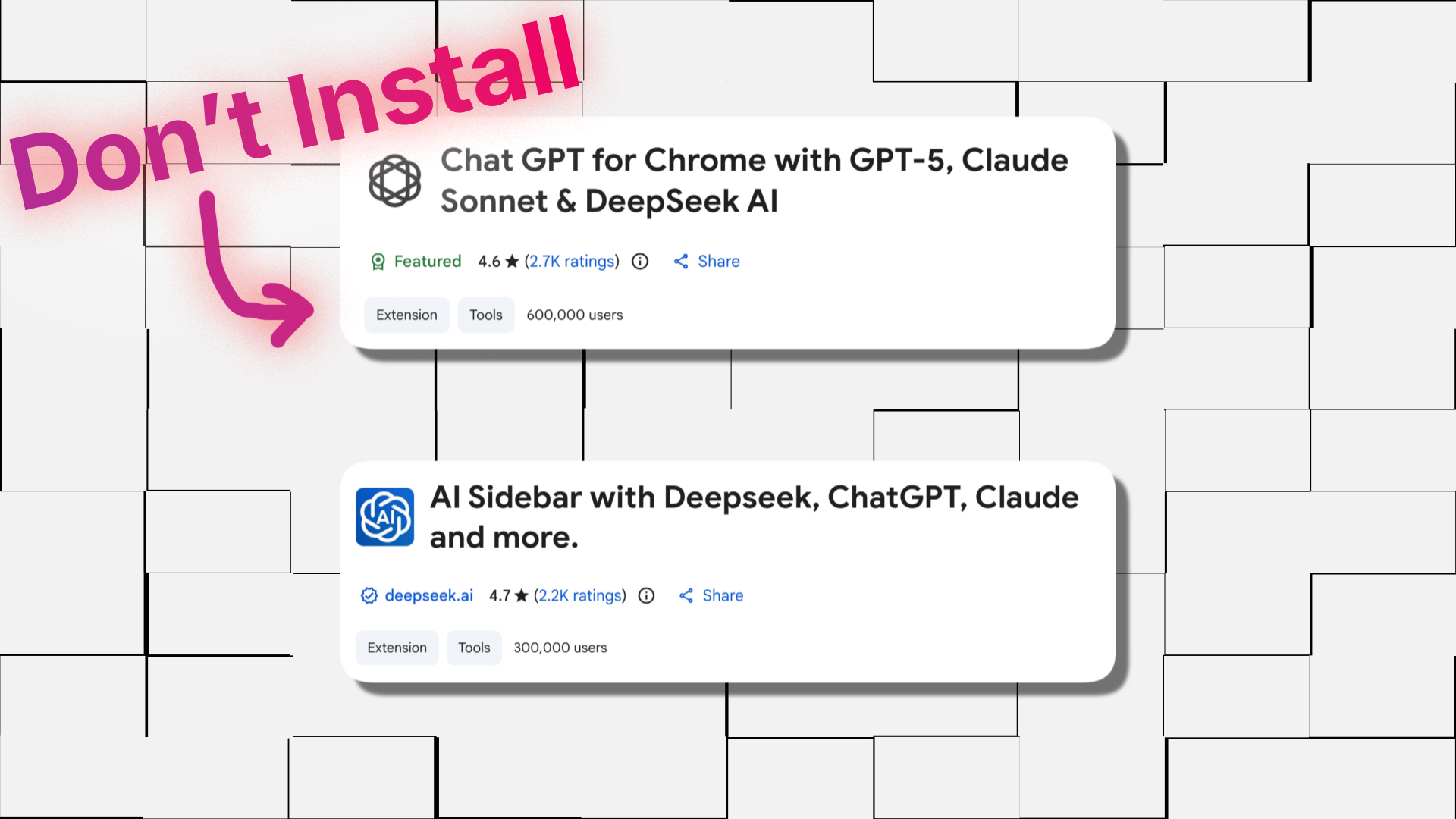
If you were one of the unlucky 900,000, you might have seen a name pop up like “Chat GPT for Chrome with GPT-5, Claude Sonnet & DeepSeek AI”.
The researchers at OX found that these extensions were doing a lot more than just helping you write emails. They were running background scripts to siphon off data.
Network Recon: Hitting the Cloudflare Wall
Since we are already in detective mode, I decided to look outside the browser and map out their infrastructure using DNS Dumpster.
A few days ago, if you pinged the domains deepaichats[.]com or chatsaigpt[.]com, you could actually find their origin IPs exposed. It was a classic “OpSec” fail, they left the back door open while locking the front gate. I could visit the IPs directly and see their backend responding.
But checking it again today? Sab block kar diya (They blocked everything).
They have now routed everything strictly behind Cloudflare. Direct IP access is gone. This is a crucial detail because it tells us the threat actors are active and reactive. They aren’t just letting this botnet run on autopilot; they saw the security reports, realized their mistake, and hardened their infrastructure immediately to stop researchers from probing their servers.
But let’s back up a bit. How did nearly a million people get tricked into installing this?
The “AITOPIA” Impersonation of Malicious Chrome Extensions
Here is the genius—and the wickedness—of this campaign. The threat actors didn’t build a crappy, broken extension. They took a legitimate product, an extension by a company called AITOPIA, and they cloned it.
Imagine someone steals your favourite barista’s apron, stands behind the counter, and makes you the perfect cappuccino. It tastes right, it looks right, but while they’re frothing the milk, they’re taking photos of your credit card.
The malicious extensions were:
- Chat GPT for Chrome with GPT-5, Claude Sonnet & DeepSeek AI (ID:
fnmihdojmnkclgjpcoonokmkhjpjechg) - AI Sidebar with Deepseek, ChatGPT, Claude and more (ID:
inhcgfpbfdjbjogdfjbclgolkmhnooop)
The first one even had a “Featured” badge on the Chrome Web Store. Socho zara (Just think about it). We train users to trust official stores, to look for badges, to read reviews. These guys gamed the whole system. The extensions actually worked! They gave you the sidebar, they let you chat with LLMs. The utility was the bait.
The “Consent” Trap
When you installed the malware, it threw up a permission box asking to collect “anonymous, non-identifiable analytics data.”
We’ve all seen this, right? We all click “Agree” because we want the shiny new tool. But in this case, “anonymous analytics” was a lie. It was actually code for “we are going to record everything you say to ChatGPT and everywhere you go on the web.”
Under the Hood: How the Malware Works
Let’s get technical for a minute. I need a sip of coffee for this part.
The core mechanism of this malware relies on the chrome.tabs.onUpdated API. In the world of Chrome extensions, this is like having a wiretap on the browser’s navigation system. Every time you open a tab, refresh a page, or navigate to a new URL, this event fires.
The malware listens for this event. When it triggers, it grabs the URL.
// Pseudo-code representation of what the malware is doing
chrome.tabs.onUpdated.addListener((tabId, changeInfo, tab) => {
    if (changeInfo.status === 'complete') {
        // Gotcha! Capturing the URL
        saveToLocalStorage(tab.url);
    }
});
But they didn’t stop at URLs. They wanted the gold: your AI conversations.
Stealing the Brainwaves
The script specifically monitors for URLs containing “chatgpt” or “deepseek”. When it spots one of those, it doesn’t just look at the URL; it injects code to parse the DOM (Document Object Model).
It looks for specific HTML elements—the divs and spans that contain your prompts and the AI’s answers. It scrapes this text, bundles it up, and prepares it for exfiltration.
Now, they couldn’t just send plain text; that might trigger firewalls or look suspicious in network logs. So, they used Base64 encoding.
If I were to manually decode what they were sending, it would look something like this in the terminal:
# Simulating the decoding of exfiltrated data
echo "eyJ1cmwiOiAiaHR0cHM6Ly9jaGF0Z3B0LmNvbS8uLi4iLCAidXNlcl9pZCI6ICJncHRDaGF0SWQifQ==" | base64 -d
Output: {"url": "https://chatgpt.com/...", "user_id": "gptChatId"}
They were sending this data in batches every 30 minutes to their C2 servers (deepaichats[.]com). It’s a “slow and low” approach—trickling data out so it doesn’t cause a massive spike in bandwidth that a sysadmin might notice.
The “Lovable” Evasion Technique
This is the part that really caught my eye. The threat actors used a platform called Lovable.
Lovable is a legitimate AI-powered web development tool. The attackers used it to host their privacy policies and other infrastructure components. By doing this, they successfully anonymized their backend.
If a researcher tried to trace the IP addresses or the hosting providers of the privacy policy pages, they would just hit Lovable’s infrastructure. It’s a digital dead end. Samajhdaar hain yeh log (These people are smart). They are living off the land, using our own development tools against us to hide their tracks.
Why Should You Care? (The Potential Damage)
“Okay,” you might say, “So they saw I asked ChatGPT for a recipe for Butter Chicken. Who cares?”
If only it were that simple.
The malware was exfiltrating all Chrome tab URLs. Think about what is often in a URL:
- Session Tokens: Poorly designed web apps often put session IDs in the URL parameters.
- Internal Corporate Links: URLs like
jira.internal-company.com/browse/PROJ-123reveal your company’s internal structure. - Search Queries: Everything you Googled.
And for the AI conversations? We treat ChatGPT like a therapist or a senior engineer. The stolen data likely includes:
- Proprietary Source Code: “Debug this Python script for me…”
- Business Strategy: “Draft a memo about acquiring Competitor X…”
- PII: “Write a cover letter for [Name], living at [Address]…”
This data is being sold. It’s likely already floating around on underground forums, packaged as “Corporate Intel.”
Remediation: Scrubbing the Infection
If you are reading this and sweating because you have an extension named “AI Sidebar” installed, here is what you need to do immediately.
1. The GUI Method (For the faint of heart)
Go to chrome://extensions in your address bar. Look for the extensions mentioned above. Even if you don’t see the exact name, look for anything installed recently that claims to be a sidebar for ChatGPT. Remove it.
2. The Verification Method (For us nerds)
After you remove it, verify it’s actually gone. Go back to your terminal.
Linux/macOS:
# Check if the directory still exists (using the malicious IDs)
ls -R ~/Library/Application\ Support/Google/Chrome/Default/Extensions/ | grep -E "fnmihdojmnkclgjpcoonokmkhjpjechg|inhcgfpbfdjbjogdfjbclgolkmhnooop"
Windows PowerShell:
# Check for the malicious IDs recursively
Get-ChildItem -Recurse "$env:LOCALAPPDATA\Google\Chrome\User Data\Default\Extensions" | Where-Object { $_.Name -match "fnmihdojmnkclgjpcoonokmkhjpjechg|inhcgfpbfdjbjogdfjbclgolkmhnooop" }
If that returns anything, you need to manually delete those folders. rm -rf (or Remove-Item -Recurse -Force on Windows) is your friend here, but use it carefully, please!
3. Rotate Your Credentials
Because they stole session data and URLs, assume your active sessions are compromised. Log out of sensitive services. Change passwords for your corporate accounts. It’s a pain, I know, par karni padegi (but it has to be done).
A Final Thought
This attack vector is terrifying because it exploits trust, not software vulnerabilities. There was no buffer overflow here, no zero-day exploit in Chrome itself. It was pure social engineering combined with the excessive permissions we blindly grant to extensions.
Google is reviewing this, and usually, they are pretty quick to ban the hammer, but the fact that these extensions sat there with “Featured” badges for weeks is a wake-up call.
In our next article, we’re going to look at Browser Fingerprinting and how you can track users even without cookies—basically, how the internet stalks you even when you think you’re invisible. But for now, check your extensions, clean up your browser, and maybe switch to decaf if this article stressed you out too much.
Stay safe, stay paranoid.
Frequently Asked Questions (FAQs)
Q1: How do I know if I have the malicious ChatGPT extension installed? A: Check your Chrome extensions list (chrome://extensions). Look for “Chat GPT for Chrome with GPT-5, Claude Sonnet & DeepSeek AI” (ID: fnmihdojmnkclgjpcoonokmkhjpjechg) or “AI Sidebar with Deepseek…” (ID: inhcgfpbfdjbjogdfjbclgolkmhnooop). If you see them, remove them immediately.
Q2: Is the official DeepSeek or ChatGPT extension safe? A: Generally, yes, but always verify the publisher. The malicious extensions pretended to be from legitimate companies. Always check the developer’s website and follow links from there to the Chrome Web Store rather than searching in the store directly.
Q3: What data did these extensions steal? A: They stole two main things: your full conversation history with AI models (ChatGPT, DeepSeek) and the URLs of every single tab you had open in Chrome. This includes search queries and potentially sensitive internal links.
Q4: Can Chrome extensions steal my passwords? A: While this specific malware focused on chats and URLs, malicious extensions with “Read all data on websites” permissions can technically capture keystrokes (keylogging) on login pages if they are designed to do so. This is why limiting extension permissions is crucial.
Q5: Why did Google Chrome mark a virus as “Featured”? A: The “Featured” badge is often automated based on user counts and ratings. The attackers used bot networks or fake reviews to inflate their numbers, tricking Google’s algorithm into trusting them. It’s a flaw in the system that attackers are increasingly exploiting.